A local-first workspace for Mac.
Never the cloud.
Documents, tasks and meetings in one place — with an agent across all of it. Free, open source, and it all runs on your Mac.
584 downloads · Free & open source (MIT) · No account required · macOS 26.0+ on Apple Silicon
Reading in the browser? Add the Chrome extension — it asks the same model running on your Mac.
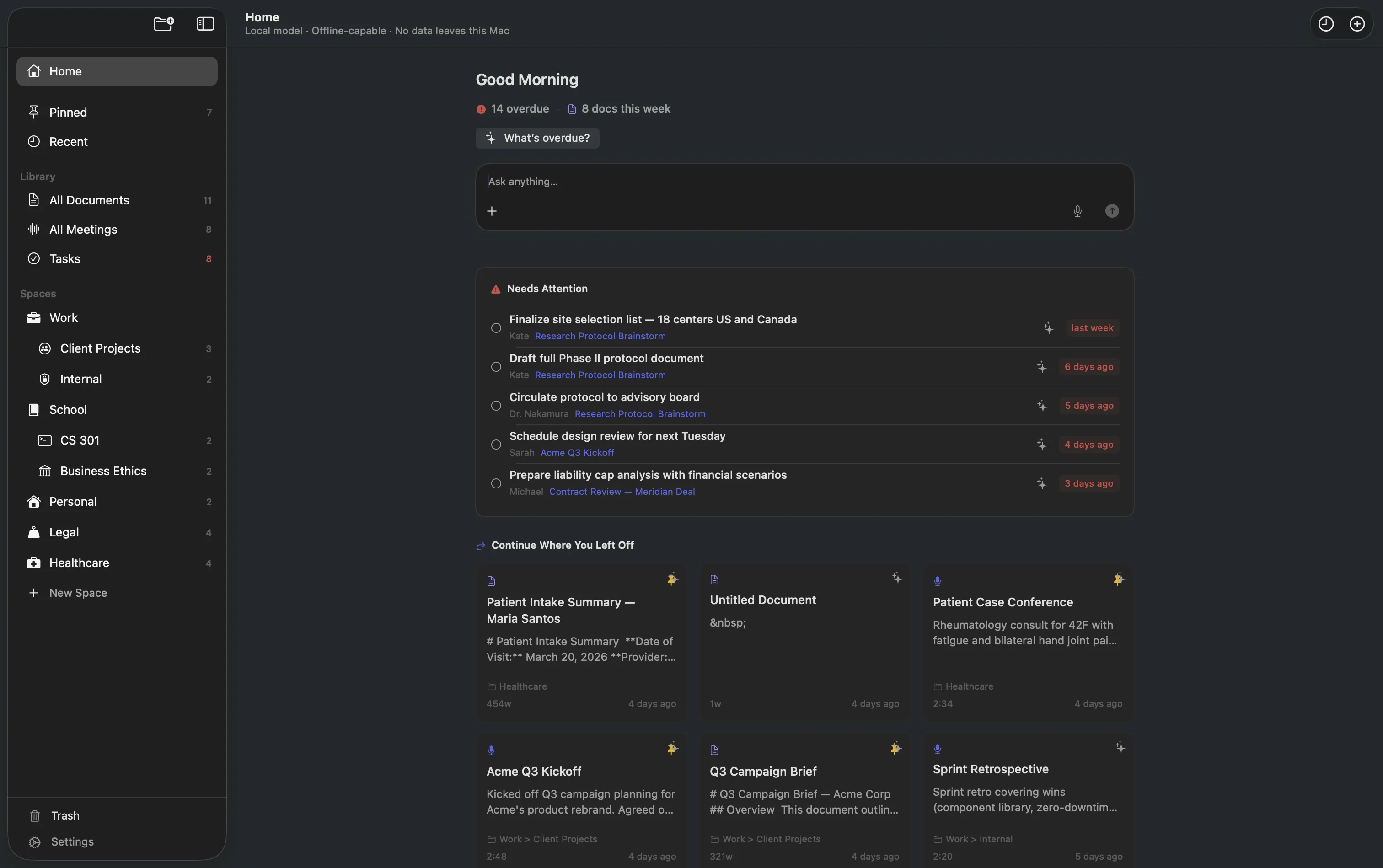
Apple Silicon Native
Metal + MLX accelerated
AES-256 Encrypted
All data at rest
169 stars on GitHub
MIT — audit the code
100% Local
Zero data transmitted
#8 Repository of the Day
Swift, July 28, 2026
No confidentiality trade-offs to reason about — because you don't have to take our word for it. Every line of Logue is public, so you can verify exactly what runs on your Mac and what never leaves it.
Read the source on GitHubHow Logue Solves It
One app. On your Mac. No cloud.
Every feature runs locally using Apple Silicon. Download, install, and start working — no account, no cloud setup required.
Offline AI writing and grammar checking, with 55 templates
Cloud writing tools read every word you type.
Grammar checks, rewrites, and 55 built-in templates — all running on your Mac. Your documents never leave your device, so you can write freely about anything.
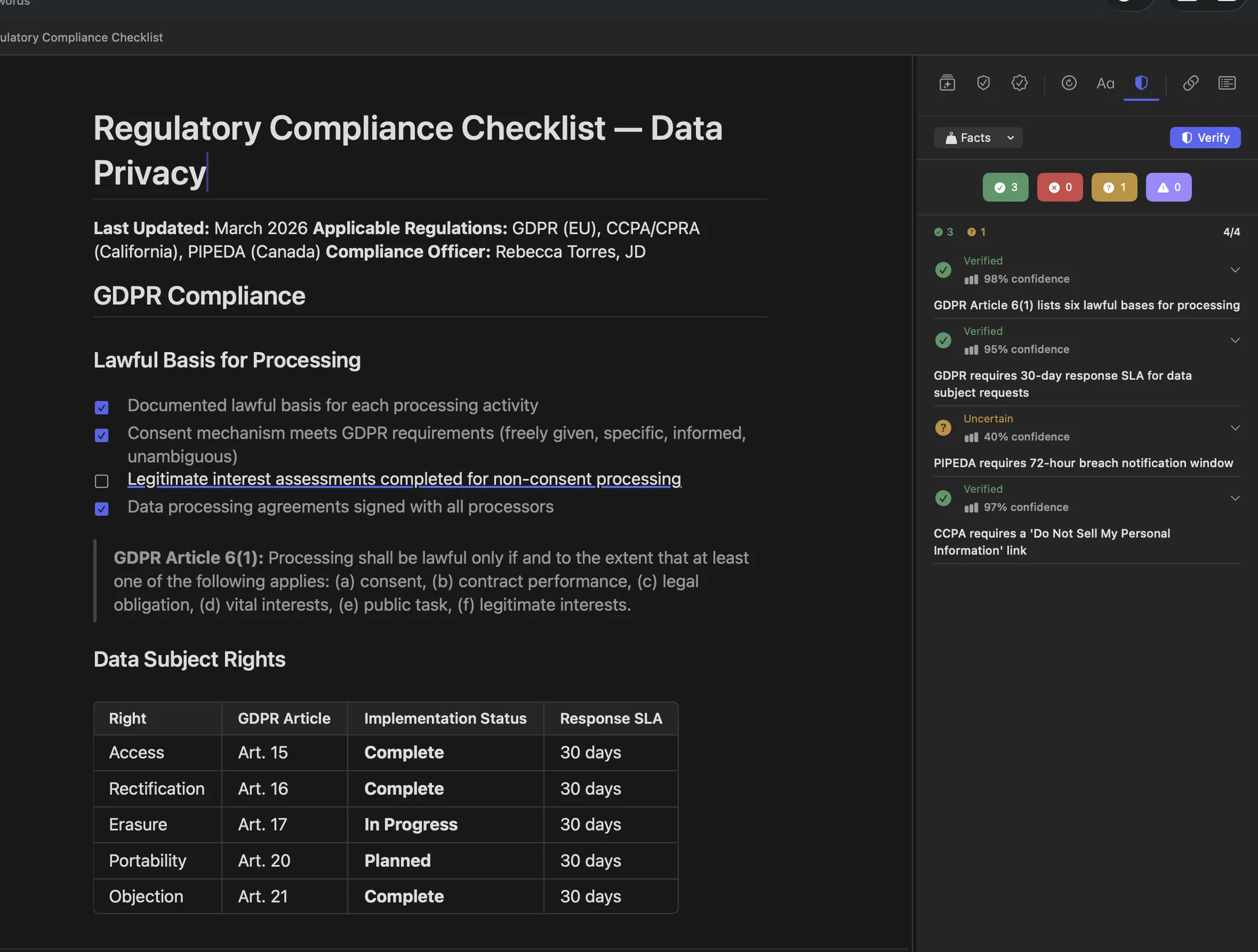
Meeting transcription with speaker labels — no bot joins your call
Cloud transcription services upload your audio to remote servers.
Logue captures system audio directly — no bot joins your call. It runs speaker diarization to label who said what, generates Smart Minutes with action items, and keeps the entire recording on your Mac.
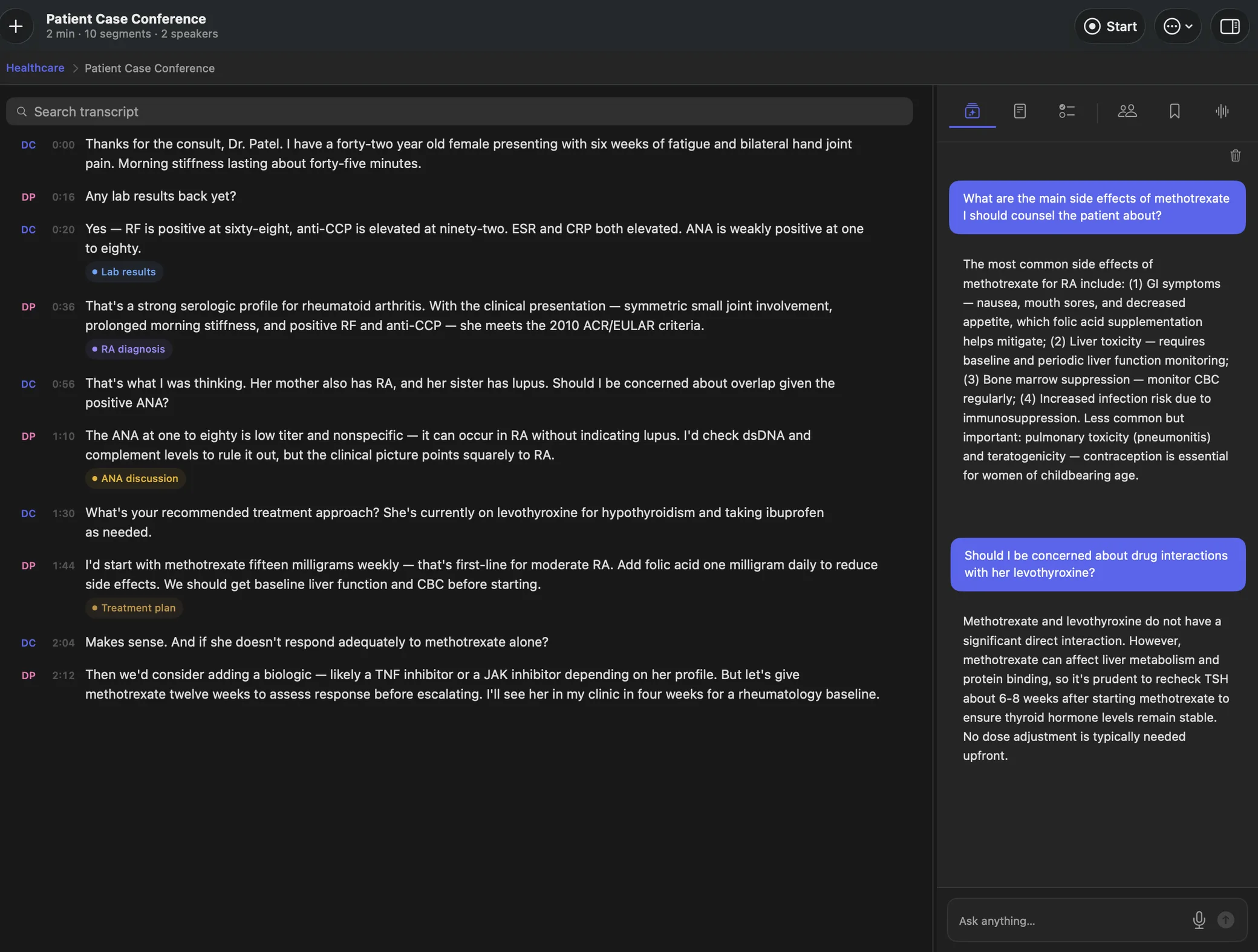
Action items become tasks you can actually work
What a meeting decided is lost the moment the call ends.
Logue pulls the action items out of a meeting into a real list, each one keeping a link back to the meeting it was decided in. Due dates, priorities, tags and repeats — and typing "Send the deck tomorrow #launch !" files itself.
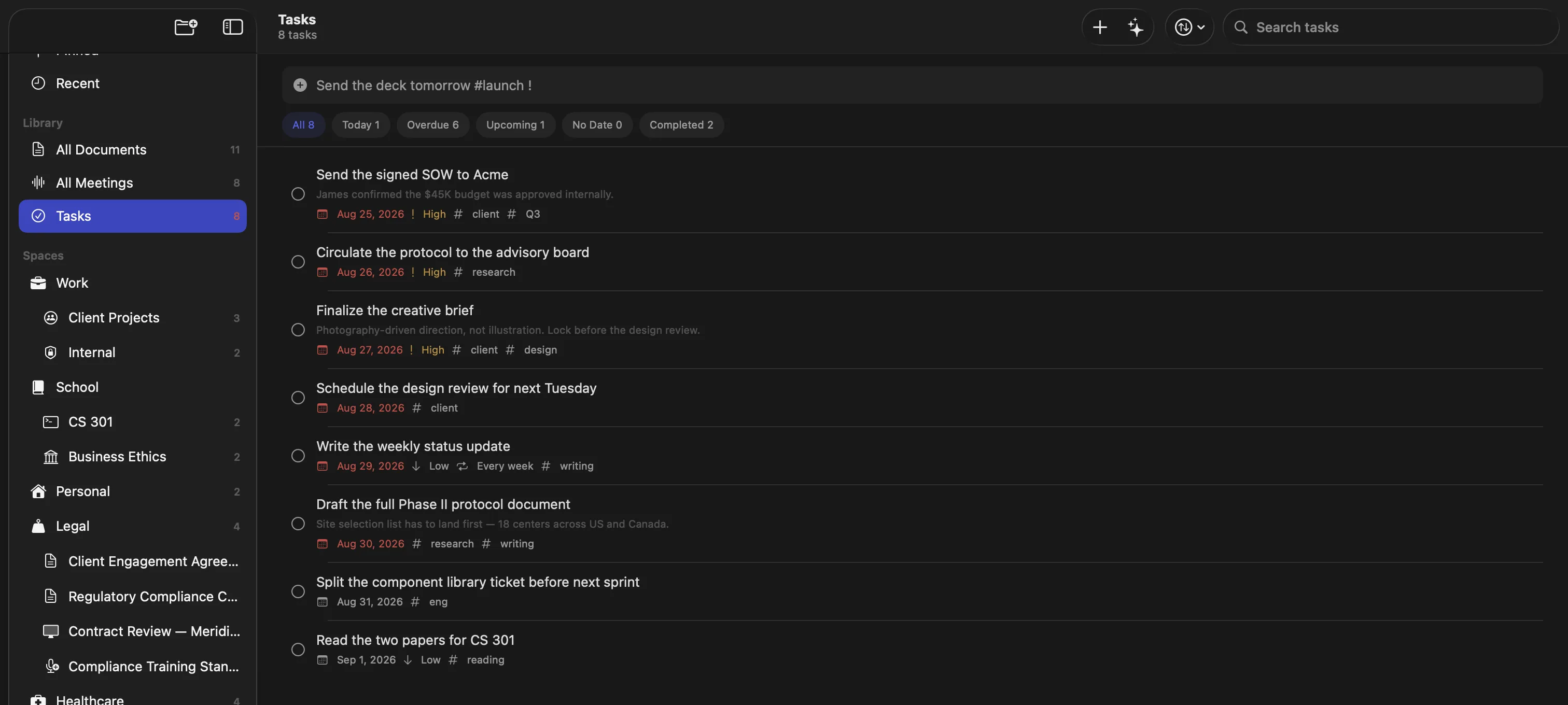
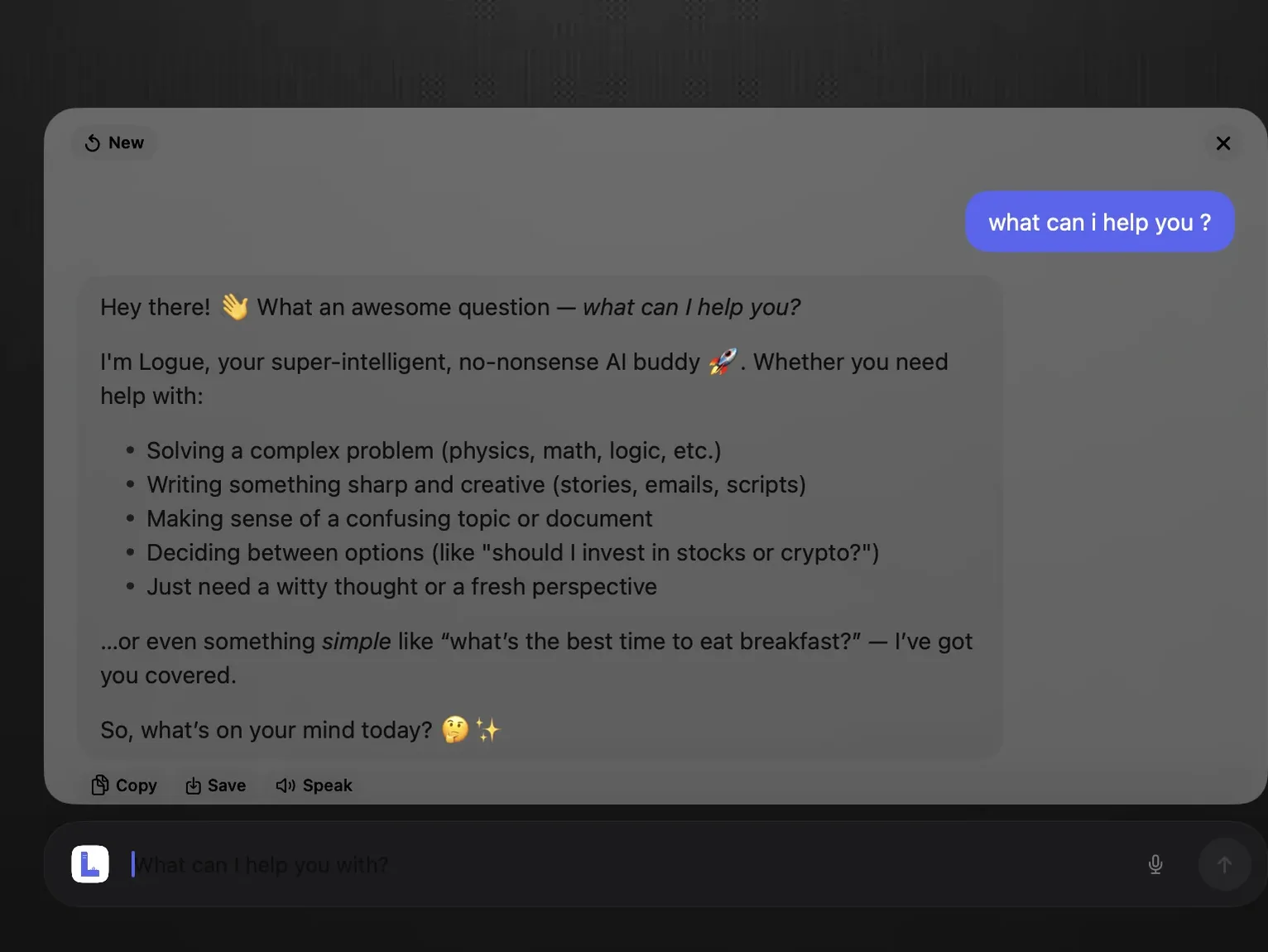
On-device PII detection across 10 categories
Sensitive data in cloud AI is a compliance liability.
Automatically flags personal information across 10 categories — government IDs, contact details, financial data, health records and more. Fact-checking verifies claims. Everything stays encrypted and offline.
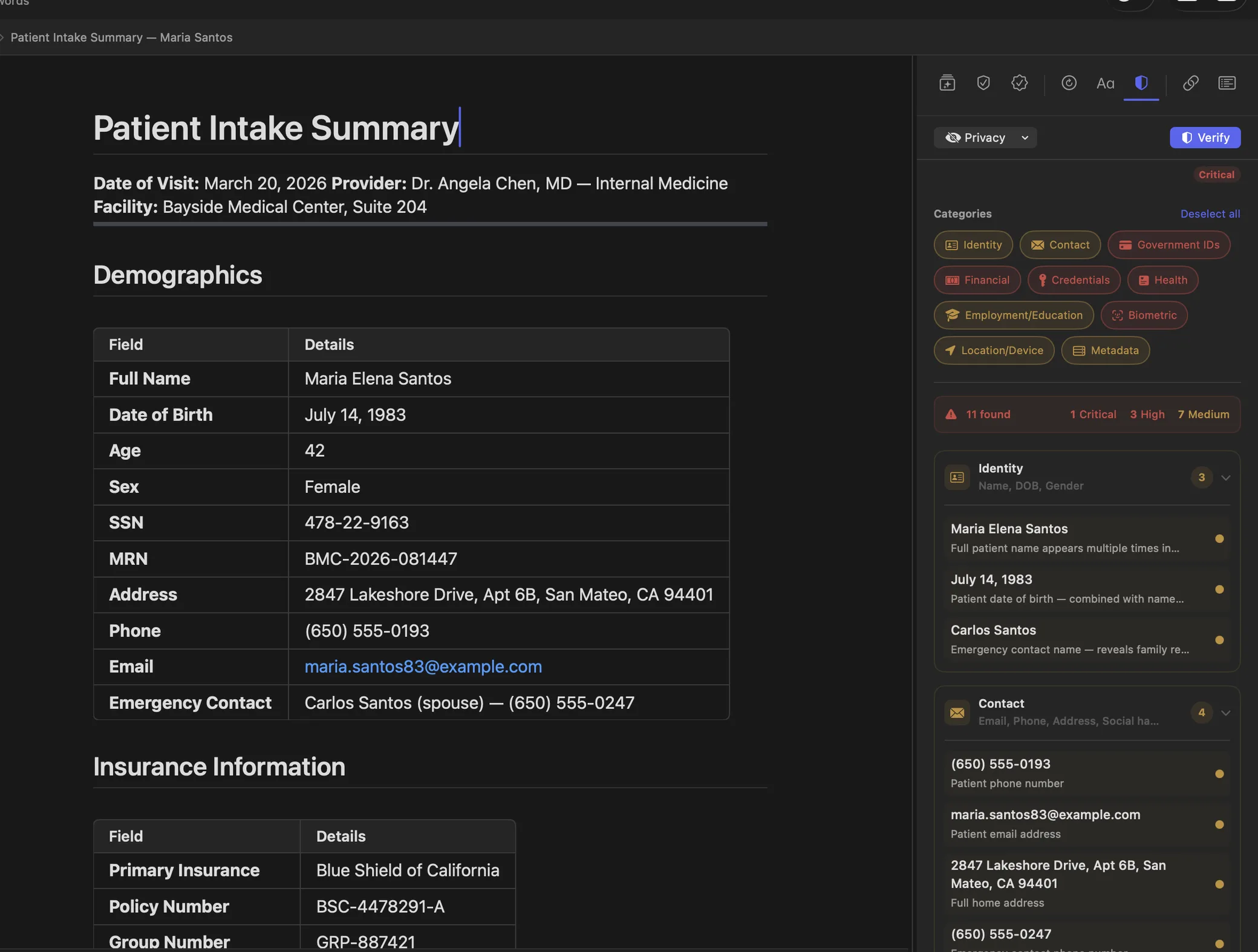
Ask Logue — an agent that goes and looks, not a chat box
An assistant that only sees the page in front of it cannot answer a real question.
Ask in plain language and Logue searches your meetings, pulls the action items, and reads the documents it needs. Every step it took is shown next to the answer, and it asks before it changes anything. All of it runs on your Mac.
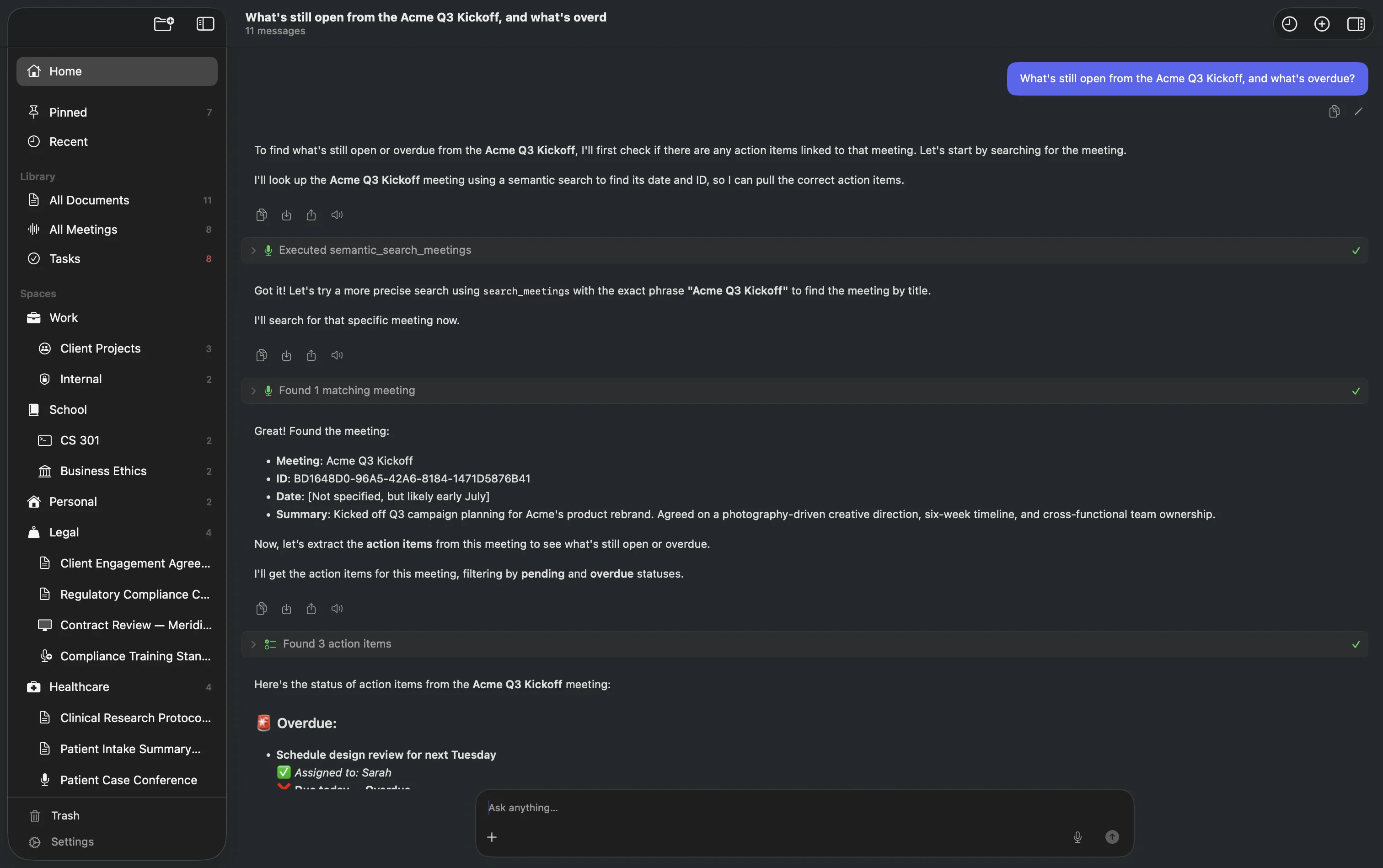
A Chrome extension that uses your Mac's model, not a server
Browser AI extensions send the page you are reading to someone else's cloud.
Ask about any tab and the answer comes from the model already running on your Mac. The extension talks to Logue over a local connection, so the page never leaves your machine. No account, no API key.
Add it to Chrome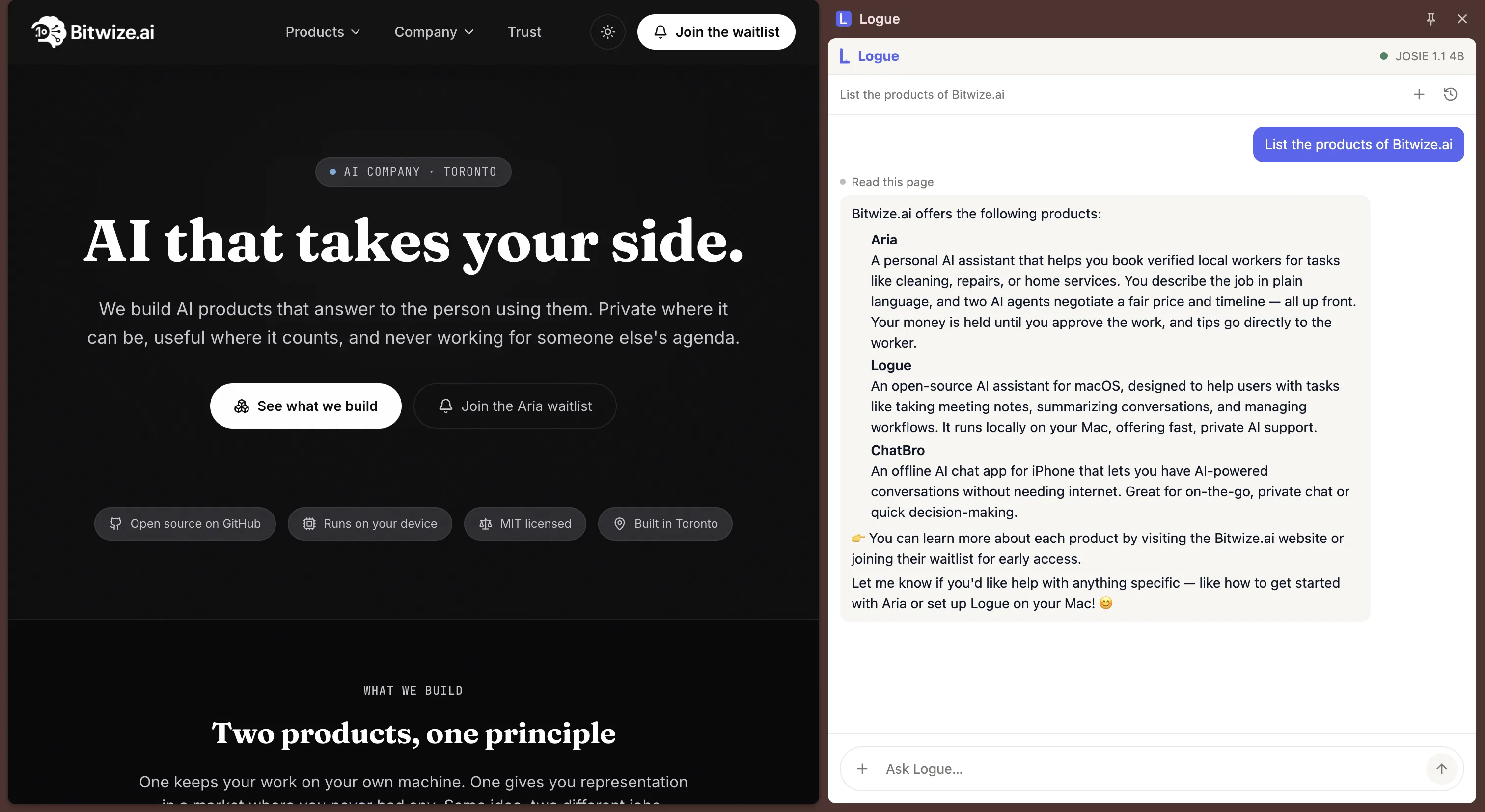
Ask Logue from any app, without switching windows
Getting an answer means leaving whatever you were doing.
A shortcut brings Logue up over whatever you are in. It reads your notes and documents, works with files you drop on it, and keeps the conversation so you can carry it into the app when you need more room.
Free forever — because it's open source, not a free trial.
Most people stitch together three separate cloud subscriptions. Logue replaces all of them — MIT-licensed, no account, no lock-in, and your data never leaves your Mac.
Otter.ai Pro — transcription
~$17/moGrammarly Premium — writing
~$12/moNotion AI — document AI
~$20/moTypical total
~$50/moThe hidden cost of cloud AI
- Sends your data to remote servers
- Requires internet to function
- Transcription caps & usage limits
- Meeting bots that join your calls
Logue
Writing + Meetings + Security
Free and open source (MIT)
Every feature unlocked — no account, no subscription
Everything included, free
- Unlimited recording & transcription
- Unlimited documents & grammar checks
- Unlimited AI writing, agent chat & PII detection
- Tasks and action-item triage
- Plain markdown storage you can take with you
- Chrome extension included
- AES-256 encrypted local storage
100% free and open source — vs ~$50/mo for three cloud tools
Everything else
The rest of what it does.
Less headline-worthy, and the reason people keep it open all day.
Workspace
Nested spaces
Organise documents into spaces and sub-spaces, each with its own icon and colour.
A real block editor
Headings, lists, quotes, callouts, code blocks, tables, dividers, Mermaid diagrams and LaTeX equations.
Document graph
A Connect panel showing a document's neighbourhood, grouped by how each item connects to it.
Import a whole vault
Bring in single markdown files or an entire vault. Subfolders become sub-spaces and frontmatter survives as document properties.
Tasks that parse themselves
Type "Send the deck tomorrow #launch !" and the due date, tag and priority are pulled out of the sentence.
Meetings
Meeting prep briefing
A context brief before the call starts, built from the documents and notes already linked to it.
Smart transcript highlights
The moments that mattered, pulled out automatically. Anything you bookmarked by hand is kept.
Meetings and documents, linked both ways
Link a document to a meeting and the meeting links back, with back-link chips in the editor.
Recordings that survive the worst
Unplug a headset mid-call, mute for ten minutes, or quit the app outright — the recording keeps its place on the timeline and the transcript is rebuilt when Logue reopens.
One dashboard for every action item
Every task from every meeting, filtered by overdue, today or this week, with an overdue count in the sidebar.
Writing and documents
Plain markdown storage
Keep documents as ordinary .md files in a Logue folder instead of encrypted storage — edit them in any editor, track them in git, or point an agent at them. Edits flow both ways. Off by default, and Logue explains the encryption you give up before you turn it on.
Wiki links and backlinks
Type [[Document Name]] to link. Links survive renames, and every document lists what points back at it.
Properties and relationships
Give documents typed fields — text, number, date, select, checkbox — and named links to other documents.
Saved views and an inbox
Filter on title, body, tag, dates, any property, pinned or unfiled — six comparators, nested all/any groups, relative dates and regex. Save any filter as a sidebar entry, and clear unfiled documents from an inbox with the keyboard.
Tone, vocabulary and rewrites
Adjust the tone of a passage, find richer wording checked against what the document actually says, or get structural feedback on the whole thing.
Writing goals
Set and track word count, reading level and tone as you write.
Tables
Create and edit real tables in the editor, with context menus.
Ask Logue
Deep Research
Long-running, multi-source research with progress you can watch, rather than a single answer that arrives or doesn't.
Every step shown, and approval before it acts
You see which tools the agent used and which documents and meetings it consulted. Anything destructive asks first.
Memory across conversations
It remembers context between threads, and all of it stays searchable.
Diagrams and maths in the answer
Mermaid diagrams and LaTeX render inline, instead of arriving as source you have to paste elsewhere.
Meeting platforms
Works with Zoom, Microsoft Teams, and Google Meet — no bot required.
Logue captures system audio directly through Core Audio, so it transcribes any call your Mac can play. Nothing joins the meeting, and the recording never leaves your device.
Zoom
Record and transcribe Zoom calls on your Mac without inviting a notetaker. Logue reads the audio Zoom is already playing, so nobody on the call sees a new participant.
Microsoft Teams
Transcribe Teams meetings locally, with speaker labels and timestamps. Nothing is uploaded, so it works on calls where an external notetaker would never be allowed.
Google Meet
Capture Google Meet calls straight from system audio. No browser extension, no bot account, and no copy of the meeting on anyone else's server.
Because capture happens at the system level, Logue also works with any other app that plays audio through your Mac — Webex, Slack huddles, or a recording you already have. It requires macOS 26.0 (Tahoe) or later on Apple Silicon.
Open Source
Open source under MIT. Don't trust us — read the code.
Logue is fully open source under the MIT license. The strongest privacy guarantee isn't a policy page — it's source code anyone can inspect, build, and verify.
MIT licensed
Free forever — not a free tier that expires. Use it, fork it, ship your own build. No telemetry, no lock-in, no strings.
Read the licenseVerifiable privacy
"Nothing leaves your Mac" isn't a promise you have to take on faith. Every line is public — read it, or point a network monitor at it and confirm.
Browse the sourceBuilt in the open
Roadmap, issues, and discussion all happen on GitHub. File a bug, request a feature, or open a pull request — the project grows with its users.
Open an issueBuild it yourself
Clone with submodules, generate the project, and build in Xcode. Dependencies are vendored — no build-time remote access — and dev builds need no Apple Developer account.
# clone, generate, build
git clone --recurse-submodules \
https://github.com/bitwize-ai/Logue.git
cd Logue && xcodegen generate
open Logue.xcodeproj
Built For
Built for legal, healthcare, education, and consulting.
Professionals who need AI tools but can't risk their data leaving the device.
Legal — AI meeting notes that don't risk attorney-client privilege
Supports ABA Model Rules for confidentiality
Draft briefs, transcribe meetings, and review contracts. Attorney-client privilege stays intact — nothing is transmitted to external servers.
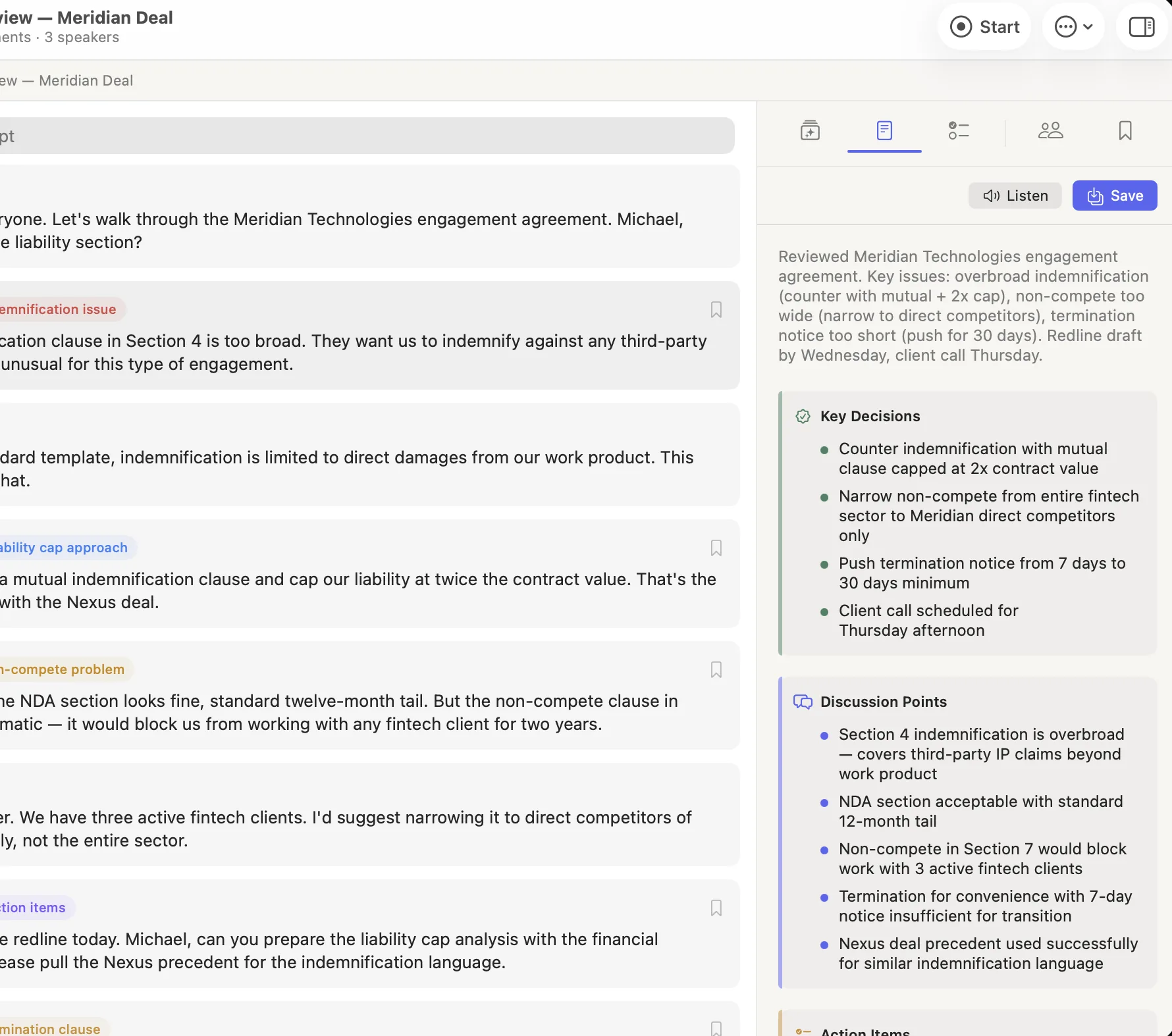
Michael's contract review
- 1Team meets to review the Meridian Technologies engagement agreement. Logue records the discussion — capturing each speaker's position on indemnification, non-compete, and termination clauses.
- 2Logue generates Smart Minutes with key decisions, discussion points, and action items — ready to share with the team. No one had to take notes.
Healthcare — clinical notes where PHI never leaves your Mac
Supports HIPAA-compliant workflows
Document patient encounters and transcribe consultations. All AI processing runs locally, so sensitive patient data never touches a remote server.
Dr. Patel's Tuesday morning
- 1Reviews yesterday's patient case conference with full speaker labels and timestamps — sees exactly who said what.
- 2Asks the AI chat clinical questions and gets instant answers, all on her Mac — no searching required.
- 3Runs PII detection before sharing — 11 items flagged including SSN, phone, and address. Reviews and redacts before export.
Education & research — FERPA-safe lecture transcription
Supports FERPA student data privacy
Transcribe lectures for accessibility, assist with research drafts, and review student work. Student records and unpublished research stay on your device.
Freelancers & consultants — client confidentiality by architecture
Client confidentiality by architecture
Write proposals, capture client meetings, and manage projects. Confidentiality isn't a policy checkbox — it's how the tool is built.
Logue FAQ — offline use, Zoom and Teams, privacy, and pricing
Logue combines writing assistance and meeting transcription into a single app — but the key difference is architecture. All AI processing runs locally on your Mac using Apple Silicon. Your documents and recordings never leave your device, while cloud tools send everything to remote servers for processing.
Yes — Logue is free and open source under the MIT license. There are no paid tiers, no trial, no account, and no usage caps: every feature is unlocked, including recording, transcription, speaker identification, Smart Minutes, PII detection, and Ask Logue. You can read the source, build it yourself, or contribute on GitHub.
Yes. Logue runs entirely on your Mac using Apple Silicon acceleration. All AI inference, transcription, grammar checking, and writing modes work fully offline. Internet is only needed for optional iCloud sync and app updates.
Yes. Logue captures system audio directly using Core Audio — no meeting bot joins your call. It works with Zoom, Microsoft Teams, Google Meet, and any other app that plays audio through your Mac.
Yes — and because Logue is open source, they can audit the code directly. Logue makes no outbound network connections for AI processing; your IT team can confirm this with any network monitoring tool (Little Snitch, Wireshark, etc.). The only network activity is optional iCloud sync, app update checks, and any external AI APIs you explicitly enable — all auditable.
Yes. Logue is open source under the MIT license — you can review the code, build it from source, or contribute at github.com/bitwize-ai/Logue. Making the code public is core to the privacy promise: anyone can verify that your data stays on your Mac.
Logue includes optional support for external APIs (OpenAI, Anthropic, etc.) that is disabled by default. When enabled, only the content you explicitly choose to send to cloud models is transmitted. All local AI models remain available and continue to process everything on-device. You control exactly what goes where.
Download the latest release from GitHub and drag Logue to your Applications folder — or build it yourself from source. Because Logue is open source, you can verify exactly what you're installing rather than trusting a black box. We distribute directly rather than through the Mac App Store to avoid sandboxing restrictions that would block system audio capture for meeting transcription. If macOS Gatekeeper prompts you on first launch, open the app via right-click → Open, or allow it under System Settings → Privacy & Security.
It connects to the Logue app over a local loopback connection on your own Mac, so the page you are reading is answered by the model already running there. Nothing is sent to a server, and there is no account or API key. The extension is open source at github.com/bitwize-ai/logue-chrome-extension, and the Mac app has to be running for it to work.
Logue requires macOS 26.0 (Tahoe) or later on any Mac with Apple Silicon (M1, M2, M3, M4, or later). AI models are accelerated using Metal and the MLX framework, optimized for Apple's neural engine and GPU.
Not yet. Logue is built specifically for macOS and Apple Silicon, using Metal and the MLX framework for hardware-accelerated AI inference. We're focused on making the Mac experience exceptional before expanding to other platforms. If what you want is Logue outside the app, the Chrome extension brings the same chat and writing tools into any tab on your Mac, still answered by the model running locally.
Download Logue free
for macOS.
Your data deserves to stay on your Mac.
Logue gives you AI writing, meeting transcription, and document security — without sending a single byte to the cloud. Free, open source, and no account required.
macOS 26.0+ · Apple Silicon · Free & open source (MIT)
Questions? support@bitwize.ai